Payroll user guides
Payroll desktop
Functionality
Import Cost Centres and Departments
Copy Companies
Import Benefits
Adding a New Pay Element
Pay Rises
Modifying Custom Reports
Company and Employee Audit Trail
Maintaining Users and User Profiles
Automatic Pension Re-enrolment
Maintaining Elements and Relationships
Average Holiday Pay improvements
Change NI Table Letter
Loans and Save Schemes
Adding additional fields to payslips
Maintaining Display Views
Viewing RTI Submissions
Standard (STD) and Live Pay Period fields
Benefits - Car Allowance Optional Remuneration Arrangement (OpRA)
Average Holiday Pay
Changing Pay Groups
Statutory Neonatal Care Pay (SNCP) - desktop version
Release v2.52
COVID-19 changes to SSP
Class 1A NI contributions
CEO Pay reporting
Termination awards
New rules for low-emission cars
Hours and Days in Payroll
Employment Allowance changes
Parental Bereavement Pay
History generation for Pensions and Pay groups
IR35 Working rules
Holiday pay calculation changes
Changes to Pension re-enrolment
Printer names on RDP
Plain Paper P45s
Release v2.56
2.56 Release Report
Payroll version 2.56 Upgrade Instructions
Health and Social Care Levy message on the payslip
Support for the Alabaster ruling
Automatic recalculation of SMP,SPP etc
New NI Letters for freeports and veterans
HMRC gateway password saving
Release v2.58
Release v.2.61
Rolled up holiday pay for irregular hours and part-year workers
Statutory Paternity Pay (SPP) legislative update
Company Sick Pay (CSP)
Diary Changes for CSP
Working Patterns
Year End Guides
OVERVIEW - Payroll desktop version 2.58
DOC A - Payroll 2.58 Upgrade Instructions
DOC B - Payroll 2.58 Upgrade notes
DOC C - Copy Year-End Instructions v2.58
DOC D - Payroll v2.58 RTI Year-End Procedure
Elements of Pay
Errors and Troubleshooting
Payroll web
Manage Employees
Creating an Employee
Editing an Employee’s details
Viewing an employee’s payslips
Making an Employee a Leaver
Printing Employee P45s
Emailing Employee P45s
Change Employee NI Letter
Running Payroll
Starting a Payroll Cycle
Edit Pay Elements
Benefits
Cost Breakdown
Run Checks
Emailing Payslips (as part of running a payroll)
BACS/RTI
View Summary and close payroll
Restart Payroll cycle
Adding and Removing Employees from Payroll
Date Effective Processing
Statutory Payments
Statutory Payments
Statutory Maternity Pay (SMP)
Statutory Sick Pay
Import Sickness
Company Sick Pay (CSP) web functionality
Statutory Paternity Pay (SPP)
Import of Sick Pay information
Statutory Neonatal Care Pay (SNCP)
HMRC Messages
Month End
Permissions
General System Use
Reporting
Emailing in the web application
Importing Data
Backing up Data in Payroll
Support is Evolving
Product Hub
Release notes
15/01/2026 - Web v.2025.3, Desktop Version 2.63.2
10/10/2025 - Web v.2025.2.3 hotfix
11/09/2025 - desktop v.2.63.1.1 hotfix
09/09/2025 - web v.2025.2.2 hotfix
08/09/2025 - Web v.2025.2.1 hotfix
29/08/2025 - Desktop v.2.63.1 hotfix
21/08/2025 - Web v.2025.2.0 and desktop v.2.63.0 release
06/03/2025 - Web v. 2025.1.0 & desktop v. 2.62.4 - Year-end release
12/12/2024 - Web v.5.8.1 release
14/11/2024 - Web v.5.8 release
03/10/2024 - Web v.5.7 release
04/07/2024 - Web v.5.6 and desktop v.2.61.4 release
16/04/2024 - Payroll - desktop v2.61.3.1 hotfix
27/03/2024- desktop v.2.61.3 - Year-end release
28/02/2024 - Web v.5.4 and desktop v2.61.1 Year-end release
11/12/2023 - desktop v.2.58.2 release
28/02/2023 - desktop v.2.58 - Year-end release
25/01/2023 - Web v.5.3 release
30/05/2022 - desktop v.2.56.2 release
24/10/2022 - desktop v.2.56.3 release
31/05/2022 - Web v.5.2 release
Year End Activities
Year-End Overview
Upgrading your system
Backing up your data
Running the installation program
Converting data directories that are not under the WINPAY directory
End of year overview (formerly RTI year-end procedure)
Last submission of the year
Print RTI amendments
Linked Companies
Year-end procedure
Update all payrolls and run check report
Copy year-end data instructions
EPS and final payments to HMRC
Print P60s
Starting the new tax year
Company year-end
Employee year-end
How to correct for a previous year
Clearing historical data (optional)
Scenarios
Contents
- All Categories
- Release notes
- 15/01/2026 - Web v.2025.3, Desktop Version 2.63.2
15/01/2026 - Web v.2025.3, Desktop Version 2.63.2
Updated
by Matt Jennings
We are pleased to announce the latest release of Payroll for web version 2025.3.0 and desktop version 2.63.2, released 15th January 2026.
These release notes will guide you through what's new in Payroll and provide links to the feature articles where required.
The next release for on-premise customers will be the year-end release.
New Features
Opt-In and Opt-Out from pension schemes in the web
What have we done?
We have introduced the ability to opt-in and opt-out employees from the automatic enrolment schemes in the web system.
To opt-in or opt-out an employee in the web system, from within the open payroll cycle on the pay elements tab, select the AE Pension button and select either Opt In or Opt Out
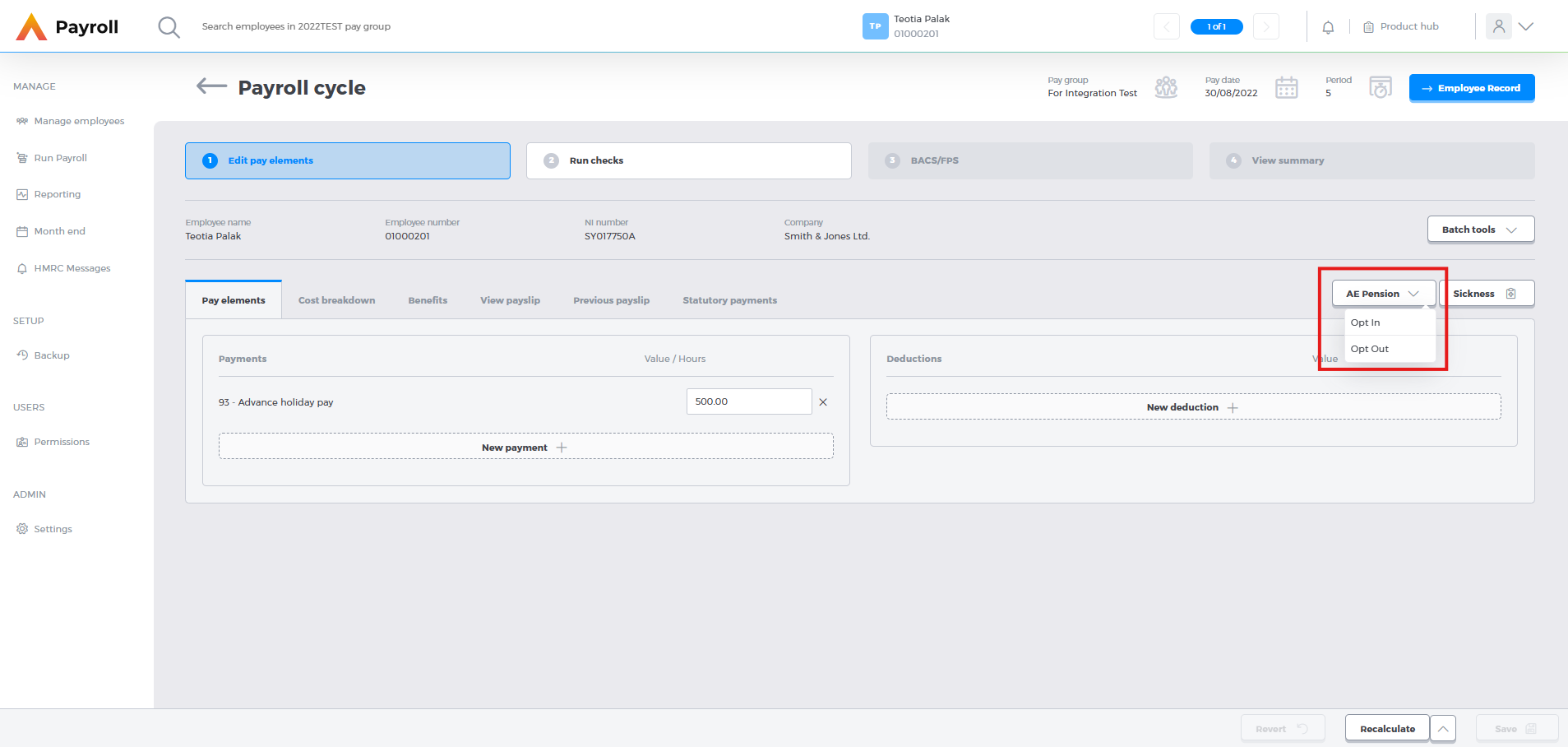
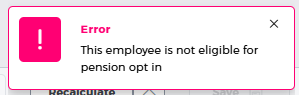
If the employee is not eligible to either opt in or out you will receive an error message.
If the employee is eligible for opting out, you will be presented with the following form to fill out
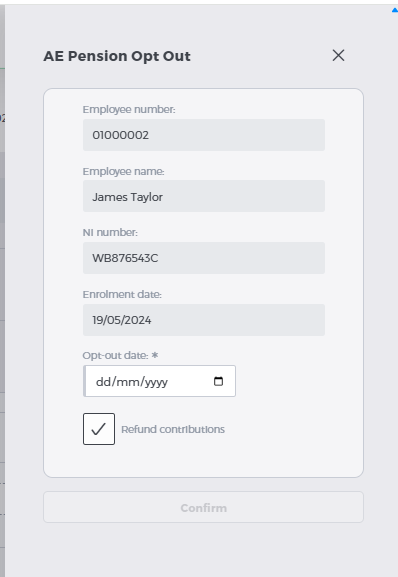
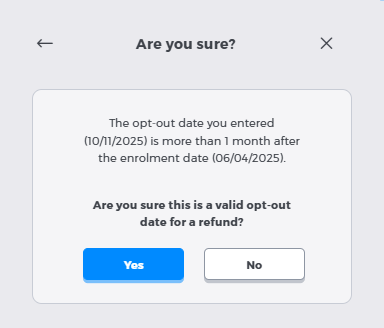
Once you have added the Opt out date and selected the whether contributions are to be refunded, click Confirm and the employee will be opted out. If the opt-out date is more than a month after enrolling and refund contributions have been selected, you will be presented with the following warning. Clicking Yes will opt-out the employee.
If the employee is eligible for opting in, you will be presented with a form to add in the opt-in details.
Payments after leaving in the web
What have we done?
We have updated the web system to allow payments after leaving for employees. Previously after adding an employee who was a leaver to the payroll, you would not be able to continue processing for this employee in the web system. This restriction has been removed so that leavers can be processed.
All validations are as they are in the desktop version. You will still need to ensure the tax code is updated to 0T manually.
Cost Breakdown fields added to the pension field list
What have we done?
To allow more flexibility in the system, we have widened the field list available for Pensions. This now includes cost breakdown fields. These can be added to the existing fields that have been selected in the desktop system in System>Maintain Pensions>Fields tab
Audit Report Improvements
What have we done?
We have updated the audit report options to allow for downloading of the report in .csv format, and to allow for selection of a single field.
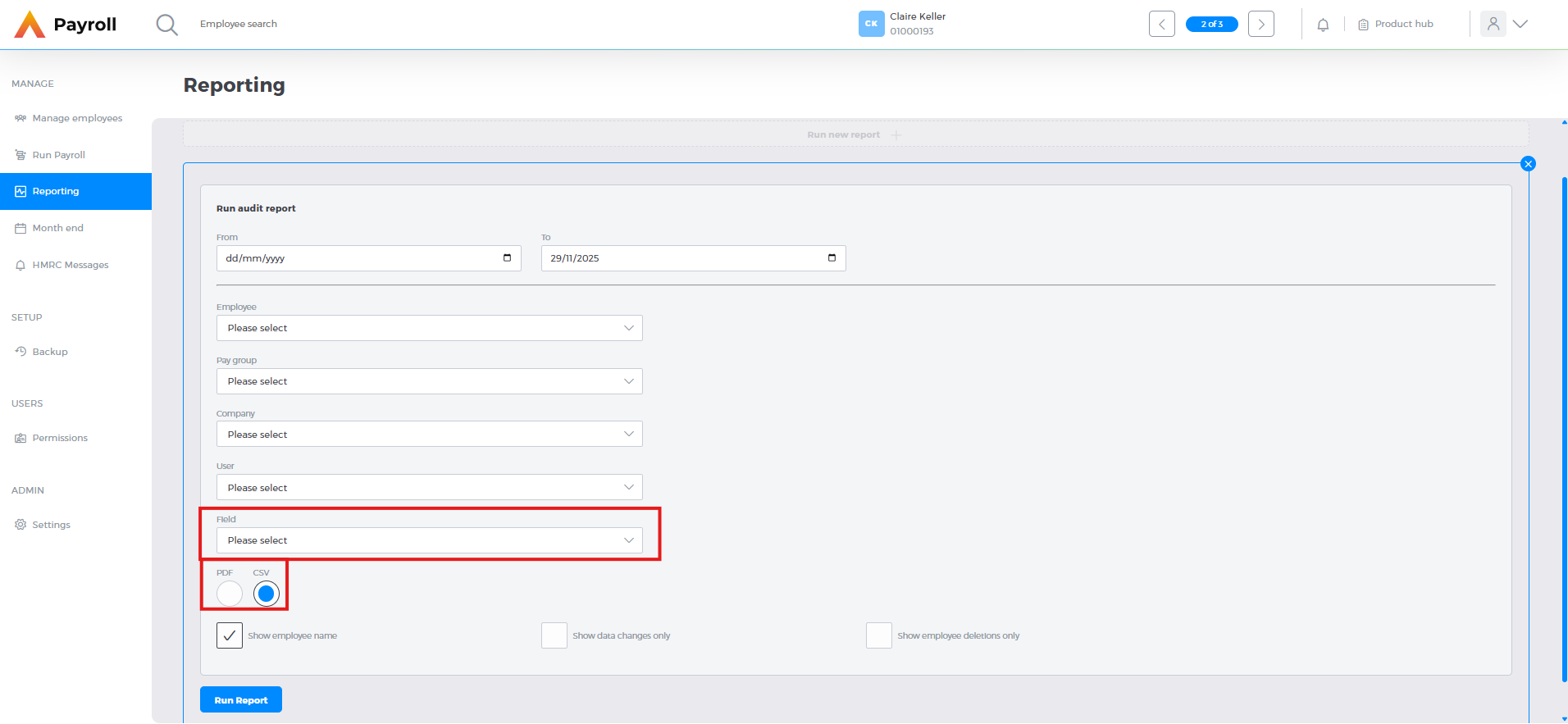
The csv option is also available in the desktop version. The field option will be available in the desktop version as part of the year end release.
Security Upgrades
What have we done?
As part of out ongoing commitment to ensuring our systems remain secure, we have upgraded the import process. These imports now run through a virus scanner prior to importing into the system.
Once imports begin you will receive a notification, and once they are complete you will receive a second notification.
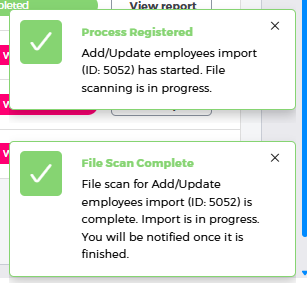
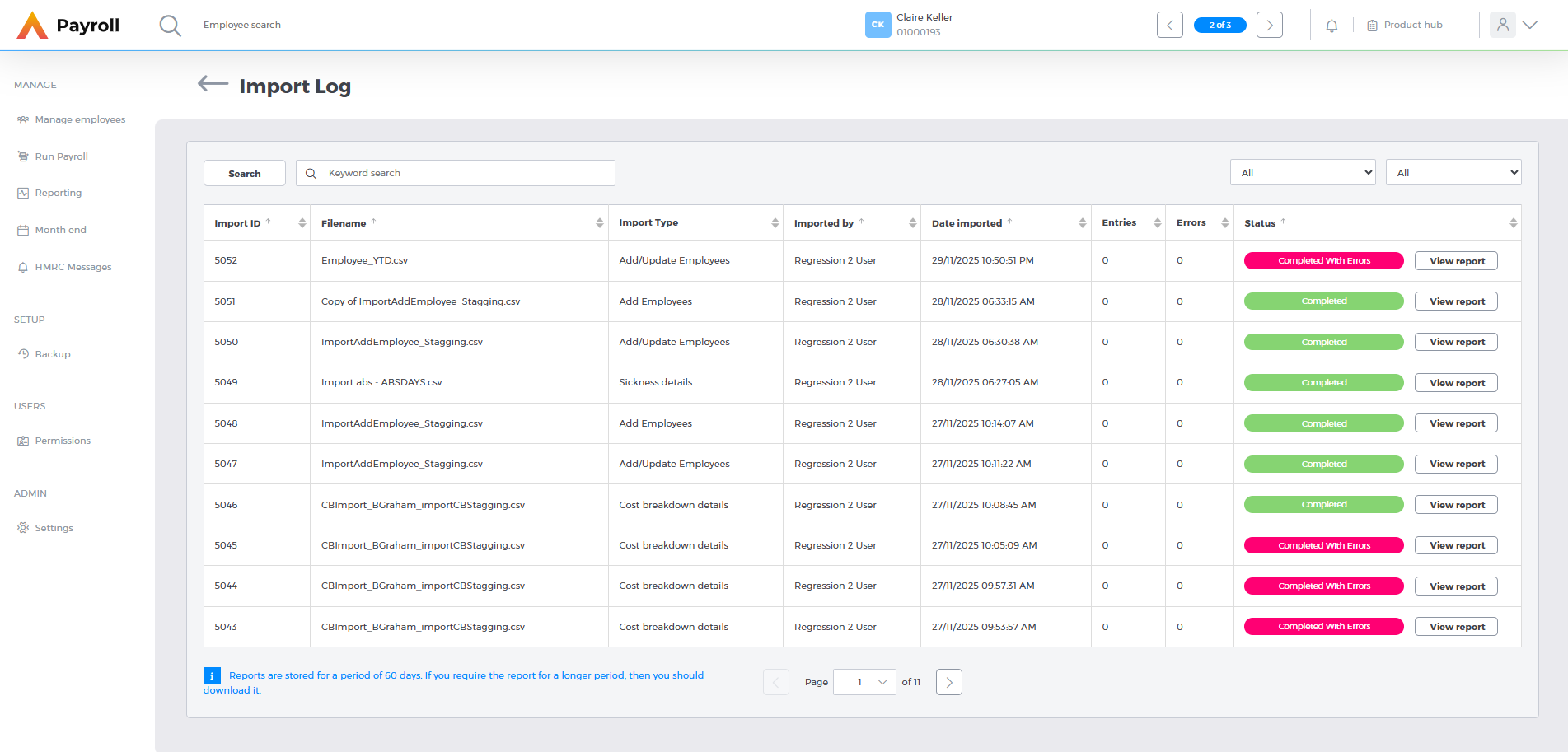
These imports can be reviewed in the Import Log. The import log can be found in Batch Tools>Import Log either in Manage Employees or within an open payroll cycle, where you can view any import that you have imported, as well as the import log, which is kept for 60 days
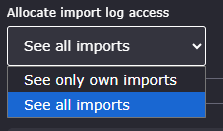
Your system administrator can set in the privileges whether you can only see your own imports or all imports. For information on how to change access rights, click here.
Payslip module now available in the OneAdvanced Mobile App
What have we done?
We have launched a new Payslip module within the OneAdvanced Mobile app.
The OneAdvanced Mobile app is powered by our Platform and allows employees to view and download their Payslips, P60's and P11d's wherever they are. Read more here