Statutory Parental Bereavement Pay (SPBP) and Statutory Parental Bereavement Pay for Northern Ireland (SPBPNI)

From 6th April 2026, a new Statutory payment, Statutory Parental Bereavement Pay for Northern Ireland will be available.
In order to support this we have added both Statutory Parental Bereavement Pay (SPBP) and Statutory Parental Bereavement Pay for Northern Ireland (SPBPNI) to the web system.
This is visible in two areas of the system: on the employee record and on the payroll on a new Statutory payments tab.
From the employee record, once navigated to the tab, you are able to view any existing statutory payments or add new ones.

To add a new instance of SPBP or SPBPNI, click the Add new instance of statutory pay button. From here you will need to select the payment type. Here you select between SPBP and SPBPNI.
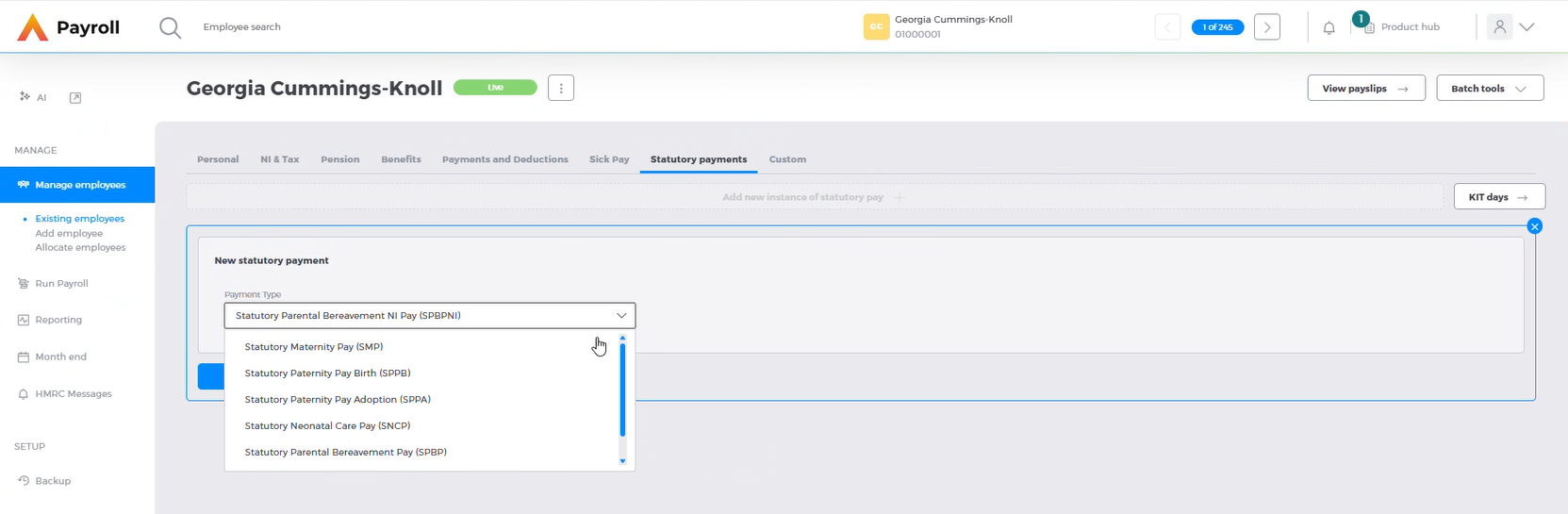
Whilst the majority of the field are the same, there are a few slight differences between SPBP and SPBPNI.
Statutory Parental Bereavement Pay for Northern Ireland (SPBPNI)
When SPBPNI is selected and next is clicked, you will need to populate the Date of bereavement. Click this to continue to the next page.
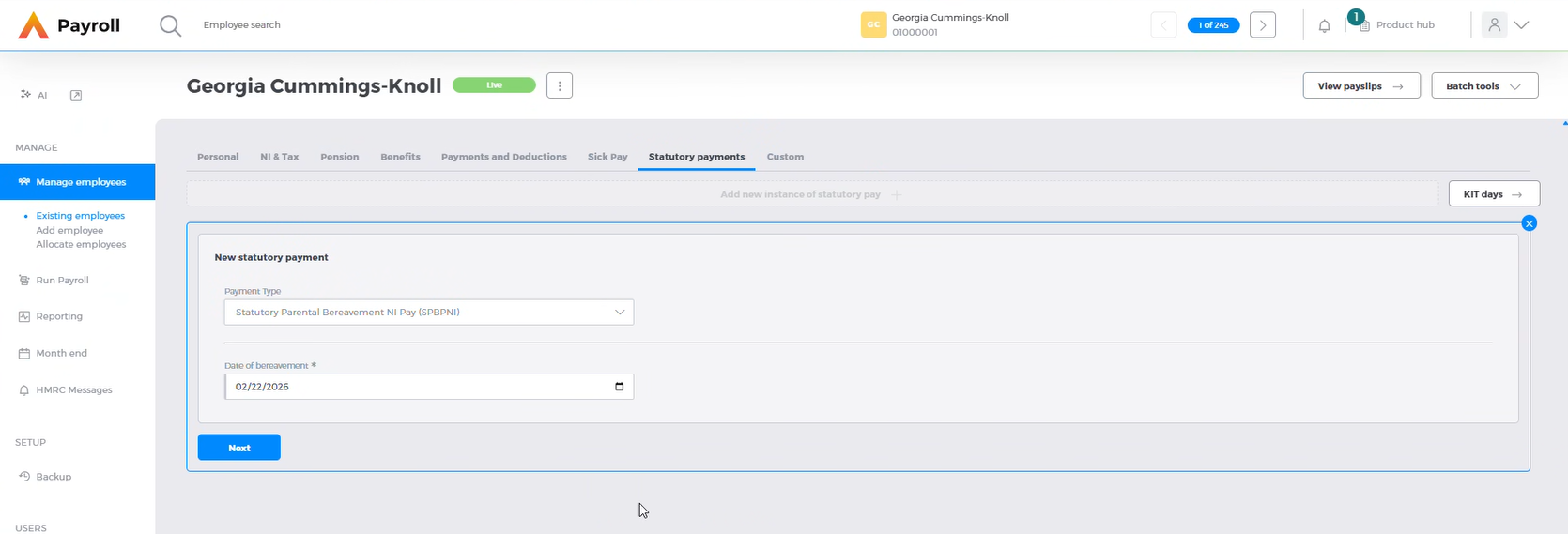
From here you will be able to enter the rest of the details for the instance of SPBPNI. This can now be split into two instances of one week that can be claimed within a year of the date of bereavement.
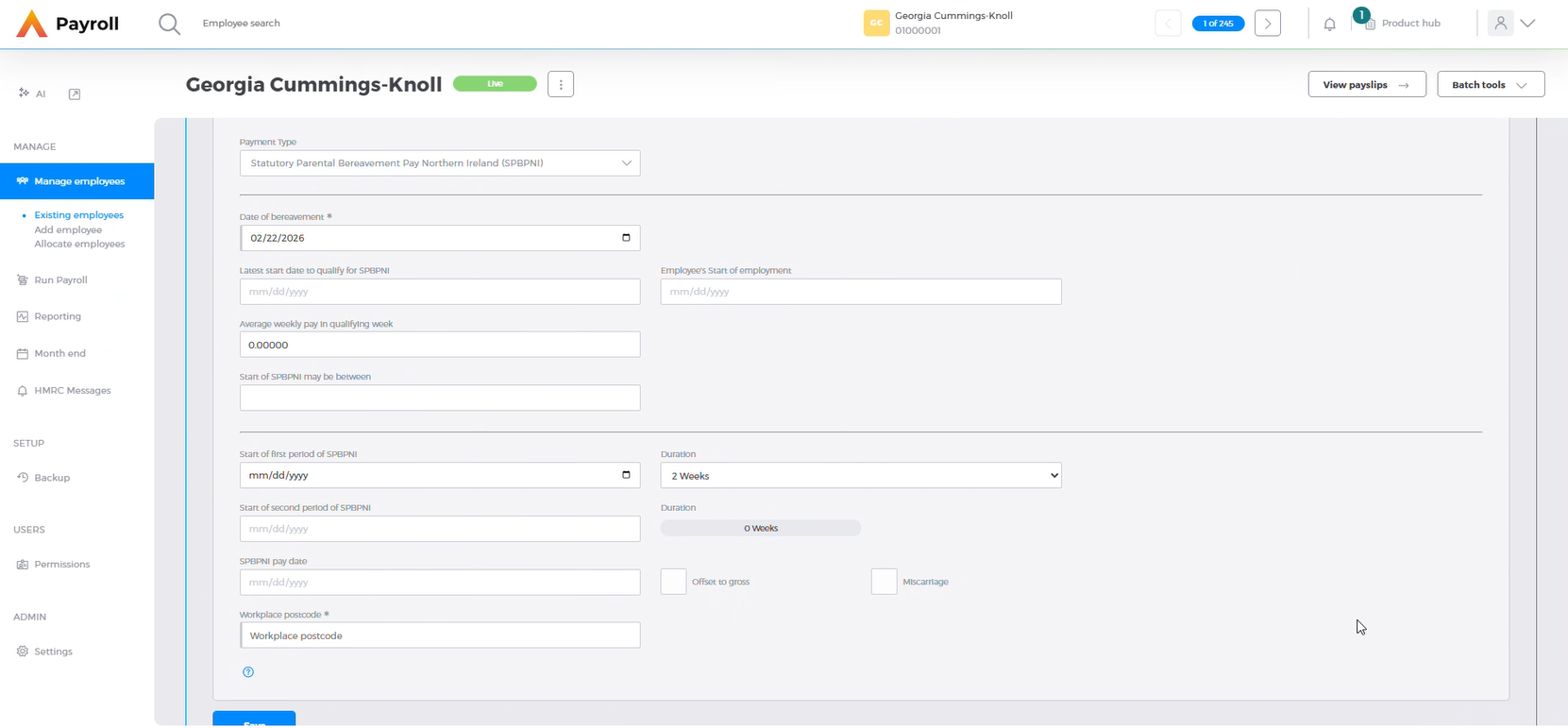
To claim the SPBP as one two-week block, enter the start date in the Start of first period of SPBPNI date box, and select 2 weeks from the duration dropdown. This will grey out the second instance entry box.

To claim two separate instances of one week, select 1 week from the dropdown. The second period of SPBP doesn’t need to be entered until it is known. Once this is known enter the Start of the second period of SPBP and the duration will automatically update to 1 week.

If you need to you are able to overwrite the Average weekly pay in qualifying week. The Offset to gross checkbox will offset the SPBP against any gross paid during the Paternity Pay period.
The ‘relevant week’ is the week, ending on a Saturday, immediately before the one in which the bereavement took place.
The relevant window is a 16-week window that is available to the employee to use to determine their eligibility to Statutory Parental Bereavement Pay. The first 8 weeks of the relevant window relates to normal weekly earnings and ends with the relevant week – the week before the bereavement. The second 8 weeks within the relevant window relate to expected normal weekly earnings, the first week of which will be the week of bereavement.
Qualifying Earnings Period Any continuous 8-week period within the relevant window may be used to calculate eligibility, with each week beginning on a Sunday and ending on a Saturday.
The average weekly pay in the system is solely calculated based on actual earnings in the relevant window.
If any future earnings are to be used as part of the average weekly pay calculation, this will need to be a manual calculation, and entered manually.
In order to process SPBPNI, a valid workplace postcode must be entered for an employee. There is validation on the FPS when sent that the postcode is a valid Northern Ireland postcode. These usually begin with BT.

If the SPBPNI being claimed is for a miscarriage, you should check the miscarriage checkbox.
Once the card has been saved, you can see how much has been processed and how many weeks have been processed, as well as the status of the SPBPNI.

To edit or delete a card, click the three dots at the side of the card and select the relevant action.
Once all fields have been entered, SPBPNI will start to be processed once the SPBPNI paid date is on or after the SPBPNI start date.
Statutory Parental Bereavement Pay (SPBP)
SPBP is largely the same as SPBPNI, however there is no Workplace postcode to enter or Miscarriage flag to set. Apart from this all fields and functionality is the same.

Statuses
During processing SPBP and SPBPNI can exist in various statuses. These are:
- Start Unknown:
The Start of first period of SPBP date has not yet been entered

- In Progress:
Several scenarios can happen here.
- SPBP is being paid for two weeks, and the pay period is at the end of week 1.
- SPBP is for one week and that week is at the end of the current period

- Ended: Several scenarios can happen here.
- SPBP has been processed for one week and there is no start date for the second instance of SPBP
- SPBP has been processed for two weeks in full

- Week 2 Not Started:
Week one has been processed, but the second week’s start date is after the current SPBP paid date

Payroll functionality
The functionality on the payroll cycle, is exactly the same as on the employee record with the exception that the Weeks Paid, Total amount paid, and Status are updated to include the values on the current payroll.
